Tia, the assistant
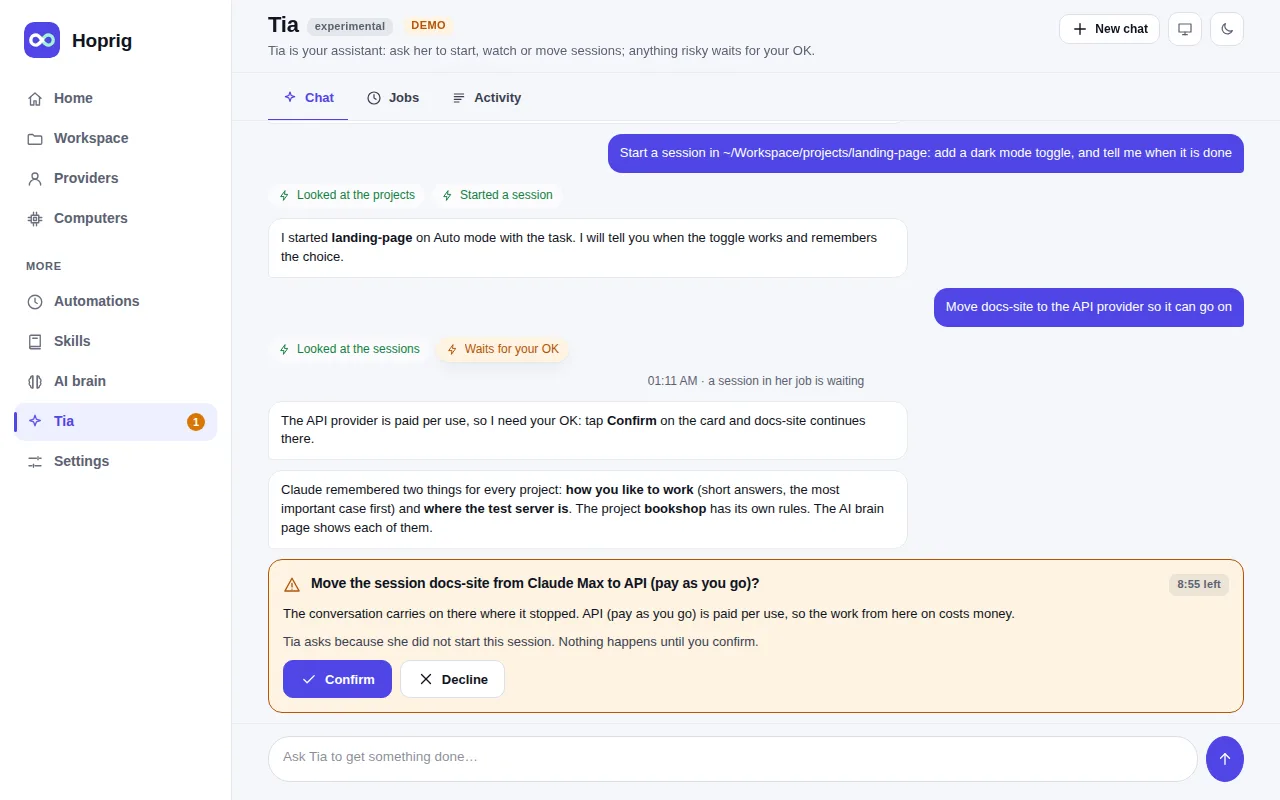
An assistant in the dashboard: a round button at the bottom right of every page, and her own page under More.
She manages what is described above and gets a coding job done for you: she opens a chat in a project, picks a
provider among the ones you allow, sends the task, watches it, and reports. She is a headless Claude Code that
may use only Hoprig's own tools (hoprig mcp; while she is on, your own Claude Code can use the same tools). She is off until you
turn her on under Settings → Tia, and she costs money: her own thinking runs on a provider you choose, and
the chats she starts run on yours.
After an update from an earlier version: earlier versions ran Tia when the settings never named her, although Settings → Tia showed her off. Now she is off until turned on. If you used her without ever touching that switch, her page says she is off and her jobs are not watched until you turn her on in Settings → Tia; her conversations and jobs are kept.
What she can do, through the dashboard's own routes (the list is ALLOW in
src/assistant/door.mjs):
- chats and sessions: start a chat (Claude Code, or OpenCode when you name it) or a terminal session, send a message, answer an OK by the rules below, stop a reply, rename, end, and move a chat or a session to another provider at a limit;
- projects: list them, start a new one, get one from GitHub, add a code repository, sync, create the missing workspace folders; read the AI brain;
- computers: their state, setup check and coding tools; run a fix, set one up, check for updates, update or install a coding tool, turn a coding tool on or off, end a process, restart or power off, add one by SSH, rename, start or stop an add-on, turn the public link on or off;
- automations, skills, and a few settings (quick messages, folders, uploads, Auto mode's order, the model and effort of new sessions, the projects folder, the working rules); one shell command on a computer, for a quick check you asked for.
What she does by herself, and what always comes to you. In a chat she started, she answers an OK by herself
only for looking at named files (reading inside the chat's folder, listing, git's reading commands without a
patch) and for the project's own checks (npm test, and npm run with one of a short fixed list of names:
test, lint, build, typecheck, check, test:unit and the like; node --test). Every change to a file,
every other command or script name, a search through every file of a folder (grep -r, rg, a patch of git diff
or git log -p, Claude Code's own search when it does not name a kind of file such as *.js), any tool she does
not know, and every OK of an OpenCode chat is your card. Whatever costs money,
stops work, installs or updates something, turns a coding tool on or off or opens the computer to the internet is a card too, with one
exception you choose: at the level Hands off (Settings → Tia; the default is Do the work) she also starts
chats and sessions on the paid API providers you allowed her, and moves the ones she started there, without asking. A
terminal session's OK is judged only by the text on its screen against a list of risky things, which is best
effort.
A chat or a terminal is hers only when she opened it on a new conversation: one she opens on an earlier conversation is not. A chat stops being hers as soon as you type into it, when its conversation went on in a terminal, and when it went on elsewhere while the dashboard was stopped (it is checked again at the start). What she reads from a chat, a terminal, a page, a file or another computer (a name, a title, an error) is data to her, never an instruction; secrets never pass through her.
Files with secrets. She does not say yes by herself to reading a file whose name says it may hold secrets
(.env, keys and key stores, key.properties, gradle.properties, Apple's .p8 keys, .yarnrc.yml, auth.json,
.my.cnf, .git/config, Terraform state, a cred folder and the like). That is a list of names, not a wall around your secrets: inside the chat's folder Claude Code's own Read
reads without asking in its default mode, and a key can sit in a file of any name. Keep secrets out of project
folders you let a chat work in.
What Tia does not do. These are your own steps; the dashboard refuses them even if she tried (NEVER in the
same file). She opens the right page for you instead:
- adding a provider, signing it in or out, or its key; another coding tool's own sign-in;
- removing a computer, pairing codes, joining and connecting computers;
- the dashboard password and sign-in, signed-in devices and one-time sign-in links, the public link's Custom set-up;
- notifications, and whether updates install by themselves;
- her own settings (what she may do, which providers she may use, her token).