I hit the Claude Code usage limit in the middle of my work. How do I keep going?
Continue the same conversation on another provider: another Claude account of yours, an API key or a gateway. In Hoprig that is one tap on the limit card, hop <provider> -c in a terminal, or, for Claude Code, Auto mode, which moves the session for you.
Who this is for
You use Claude Code for hours a day and reach the 5-hour or weekly limit in the middle of a task. You have a second provider, or would add one, but switching by hand breaks your flow.
The problem
When the limit comes, the session stops. Signing in to another account by hand with /login "breaks flow and wastes time", as one bug report put it. People search for "continue a Claude Code session on another account" or "use Claude Code with an API key when the subscription limit is hit".
What Hoprig does
hop addadds a provider: another Claude subscription, an API key or a gateway. A provider is a small file of settings, readable by you only.- At a limit, the chat or the session says so and shows your other providers as buttons. One tap and the same conversation goes on there. A chat's provider chip, or Move to another provider in a session's menu, does the same at any time.
- A provider that uses Claude Code's own sign-in can also go on with another Claude account of yours: Sign in with another Claude account, on the limit card. Until that sign-in is complete, the account of now stays.
- In a terminal,
hop work -ccontinues this folder's last session on the provider named "work". When Claude Code exits, Hoprig asks whether to continue on another provider. - Auto mode (Claude Code only) does it without a tap:
hop auto order sub api, thenhop auto on. A small router on your own computer sends each request to your subscription while it can, and to the next provider the moment it reaches its limit. When the next provider in the order is another subscription, Claude Code is started again as that account instead (a few seconds). When the subscription is free again, requests go back to it.
hop add                    # add a provider: a Claude subscription, an API key, or a gateway
hop work -c                # continue this folder's last session on the provider "work"
hop auto order sub api     # your subscription first, then an API key
hop auto on                # off at first: an API key costs money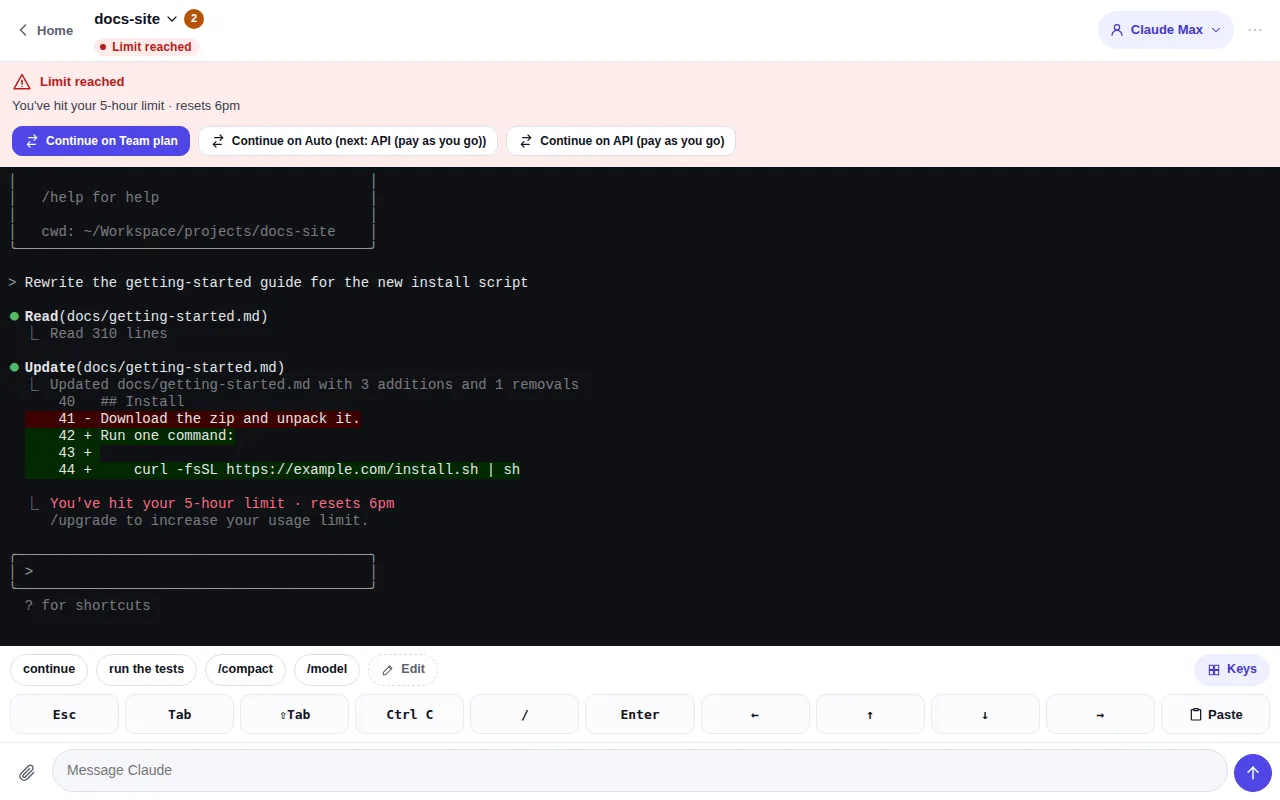
What you need
- A second provider: an API key, a gateway, or another Claude account of your own.
What it does not do
- It does not give you more usage on the same account.
- The first request after a move re-reads the whole conversation on the new provider. On an API key that is paid at full price;
/compactfirst keeps it small. Auto mode is off until you turn it on, because an API key costs money. - Whether going on past a limit on a second subscription of your own is acceptable is not clearly settled by Anthropic's terms. The surest setup is one subscription, then an API key. Never use someone else's account. Is this allowed?
- Claude Code's own Remote Control does not work through Auto mode's router or with an API key; the Hoprig dashboard is the remote for those sessions.
- If you can wait, Claude Code itself can now wait for the reset and carry on, or let you pay for extra usage. It does not move to another account or provider.