How do I review and comment on Claude Code's changes before they go on?
In a chat in the dashboard's App, press Changes in the title bar: the folder's changed files open beside the chat, unified or side by side. A + by a line opens a comment box, and Cmd/Ctrl+Enter sends all your comments to Claude as one message. If a turn went wrong, Rewind to here on your message takes the code, the conversation or both back.
Who this is for
You let Claude Code write the code, and you want to read it like a pull request before the next step: point at a line, say what is wrong, and go on.
The problem
People ask "how do I review Claude Code's changes before accepting them" or "how do I comment on a specific line for Claude". In a terminal you scroll back through diffs, copy file names and line numbers into a message by hand, and undoing a wrong turn means knowing git well.
What Hoprig does
- Before a change happens, its OK card shows the lines it removes and adds, with Allow, Allow in this session, Always allow in this project (where Claude Code offers it) and Do not allow, with a reason Claude reads.
- Changes in the title bar (or the Changes card beside the chat) opens the diff pane: the files changed in the session's folder since the last commit, Unified or Side by side. It sits beside the chat on a screen 1280 px wide or more, over it below.
- A + by a line's number opens a comment box. Enter adds the comment (nothing is sent yet), Shift+Enter is a new line. Cmd+Enter on a Mac, Ctrl+Enter elsewhere, sends every comment as one message; the button says how many. Claude reads them and changes the code, and the pane reads the folder again after each turn.
- A line that starts with
!runs as a shell command in the session's folder, such as!npm test: its output shows as it comes, Stop or Esc ends it, and it goes to the coding tool with your next message. - Each of your messages has Rewind to here: Restore code and conversation, Restore conversation, Restore code, or Never mind.
- To try another way without losing this one: Branch in the session menu (or
/branch [name]) opens a new session on a copy of the conversation;/fork [prompt]makes the copy and keeps you here. - For a task of the Work page, the run's result waits for Accept or Send back; nothing is pushed or merged by the run.
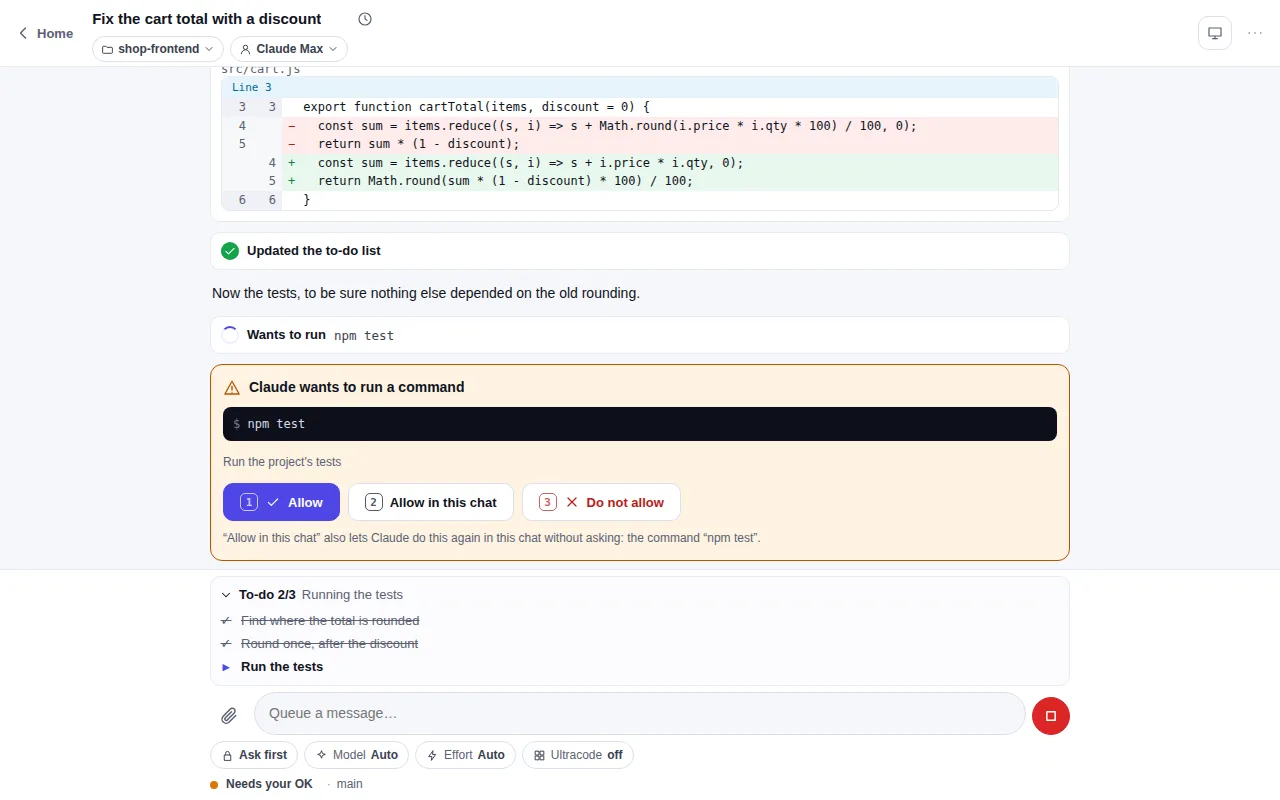
What you need
- The project's folder in git: the diff pane compares with the last commit. In a folder that is not a git repository it says there is no diff to show.
What it does not do
- Hoprig does not review the code itself; you do, and the coding tool acts on what you say.
- The diff shows every change since the last commit, yours too, not only the session's.
- Rewind is not offered while a terminal runs the conversation, and Claude Code's Summarize choices of rewind are not offered. Branch is not offered for OpenCode.
- A
!command runs for at most 5 minutes.