How do I see on one page what needs me?
Open Operator. It lists what needs you now, from everything Hoprig watches, such as sessions, providers, gateways, the public link, your repositories and the computer itself. The most urgent comes first, and each card has one button for the recommended step. While Tia's rules, Tia decides and her looks are off, nothing happens until you tap. All of them are off at first.
Who this is for
You run several sessions on one or more computers. You do not want to open every page in turn to find the one that stopped, waits for an OK or is at a usage limit.
The problem
A session that waits for you looks the same as one that works, until you open it. A gateway that stopped, a full disk or a branch that exists only on this computer is on another page again. People ask "how do I know which Claude Code session needs me" or "one dashboard for all my AI coding sessions".
What Hoprig does
- Operator is in the menu's group More, on a phone too. Its number is the count of what needs you; information alone is not counted.
- Needs you lists the items in this order: Can lose work, Stopped, Waits for you, This computer, then For your information. Inside each group the oldest comes first.
- A card says what it is about and its facts: for example a session at a usage limit, a question that waits for your answer, a session with no progress for 20 minutes, a provider near its limit, a gateway that does not answer, or a disk 85 % full.
- The card's one button does the recommended step, such as Continue on the next provider, Open the session or Restart the gateway. The other steps are under More steps. Not now hides the card until its facts change. Continue on the next provider goes to the next provider of your order under Providers → Auto mode, and it does not ask first. When that order holds a pay-per-use API key, the work from there on costs money. A rule of Tia's or Tia decides makes that move only at her level Hands off (Settings → Tia) and only within her daily limit for paid use, which counts it. With no limit set, or the limit used up, the move stays yours: the card says so in one line and offers Set a daily limit for paid use. Your own tap is not counted.
- A step that stops work that runs, or that others will see (such as Push the branch), asks you first and says so on the card. If the item changed since you looked, the tap is refused, and the card shows it as it is now.
- Beside the list: Computers, What Tia does by herself, Done by Tia, Done by you (every step you tapped), and Watched (what was read, and when). "Nothing needs you now." is said only when every source could be read; otherwise the page names the ones it could not read.
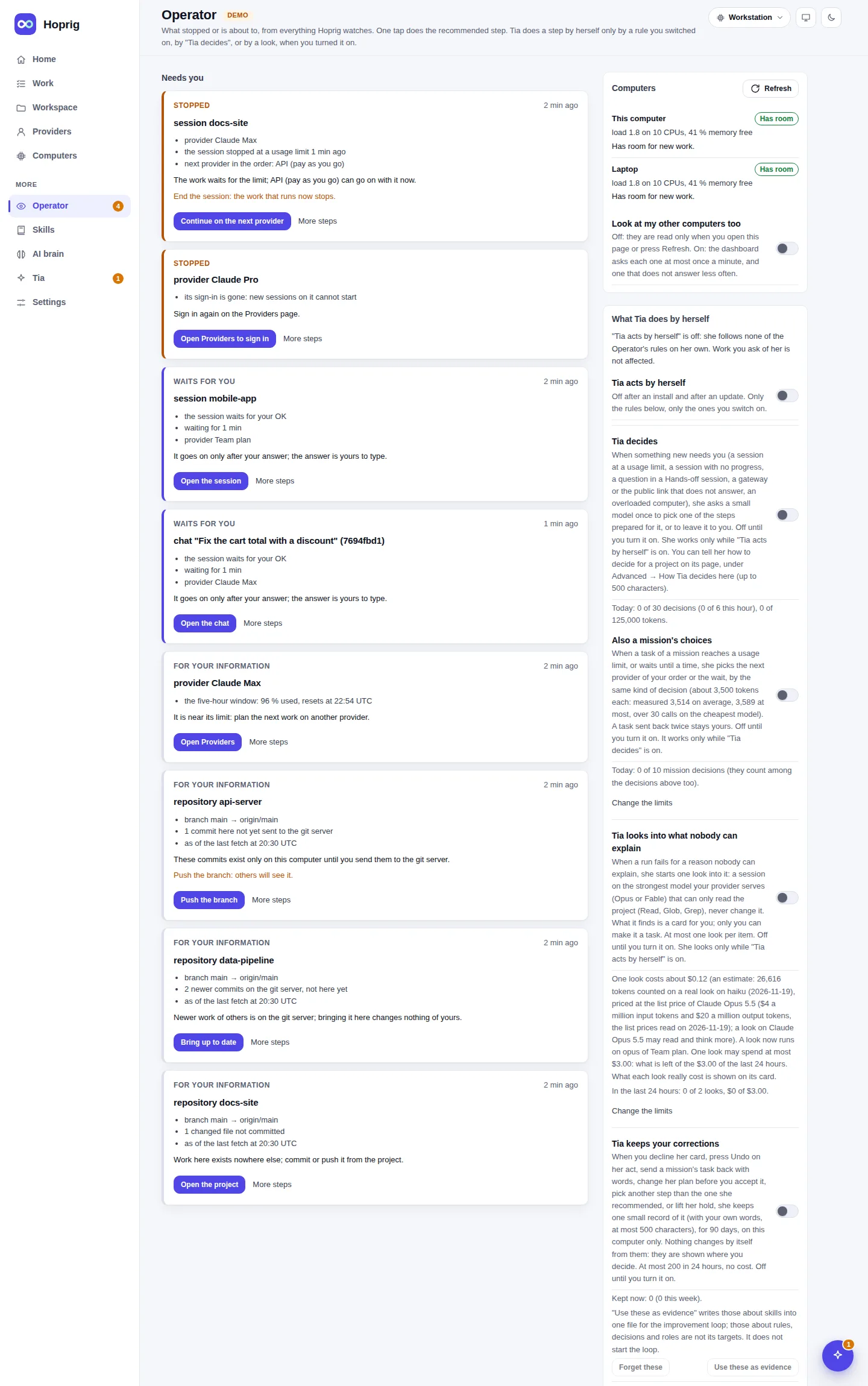
Under What Tia does by herself are switches that let Tia act without your tap, in this order. Each is off at first, and none acts while Tia herself is off (Settings → Tia):
- Tia acts by herself is the main switch. Turning it on asks you to confirm first. Tia decides, the looks and the rules work only while it is on. While it is on, the button Tia OFF stands at the top of this part and stops her at once.
- Tia decides: for something new, such as a session at a limit or with no progress, a gateway or the public link that does not answer, or an overloaded computer, she asks a small model once to pick one of the steps prepared for it, or to leave it to you. Each decision costs about 3,400 tokens of her provider, at most 30 decisions and 125,000 tokens a day at first, and is written under Done by Tia with its reason. Also a mission's choices lets her also choose for a mission's task that reaches a usage limit or waits until a time: the next provider of your order, or the wait.
- Tia looks into what nobody can explain: for a failure nobody can explain yet, she starts a session that only reads, to find the cause, at most 2 looks and $3 a day at first. Its finding is a card; only your Make it a task turns it into a task.
- Tia keeps your corrections: when you decline her card, press Undo on her act or tap another step than the one she recommended, she keeps one small record of it, at most 200 a day, for 90 days, on this computer only. Nothing changes by itself from them: they are shown where you decide, and Forget these removes them. It only keeps records, so it works also while the main switch is off.
- Last come her five rules, one switch each. For example: when a session stops at a usage limit, continue it on the next provider of your order; when a gateway or the public link does not answer, restart it. A rule acts at most 3 times an hour and 10 times a day, with 10 minutes between two tries on the same thing, unless you change its limits. The Operator guide lists all five.
Under Computers, the switch Look at my other computers too (off at first) lets the dashboard read your other computers by itself, at most once a minute. While it is off, they are read only when you open the page or press Refresh.
Every step she takes is written under Done by Tia, with Undo where the step has one.
What you need
- Hoprig's dashboard on the computer. Nothing to set up: the page reads what the dashboard already watches.
- For Tia's switches: Tia turned on in Settings → Tia, and a provider for her. Tia decides and the looks cost tokens of a provider you allowed her. One paid per use is used only at her level Hands off, only when every provider you allowed her is paid per use (Auto mode counts as paid per use here when its order holds such a provider), and only within her daily limit for paid use (Settings → Tia), which counts each of them.
What it does not do
- While Tia decides is off, a question's card only opens the session: the answer is yours to type.
- What a card says about a repository is as of the last time this computer asked its git server for news (a "fetch", done by you or by Sync). The page never asks by itself.
- On another computer's page you see its switches, but you change them on that computer's own dashboard.
- Tia's switches are experimental. Read Done by Tia before you leave a rule on.